Imagine waking up every morning to find a database full of today's news articles, already cleaned, structured and ready for analysis. No manual browsing, no copy-pasting, no formatting headaches. Just fresh data waiting for you.
That's exactly what we built: a universal news scraper that works on virtually any news website, understands natural language dates in any format, automatically discovers pagination links, stops when it reaches yesterday's articles, and stores everything neatly in a local SQLite database.
The key insight is using AI not as a chatbot but as an intelligent parsing engine. Instead of writing fragile CSS selectors that break every time a site redesigns, we let Gemini read the page like a human and extract what matters.
Architecture Overview
The system consists of three components running locally on your machine:
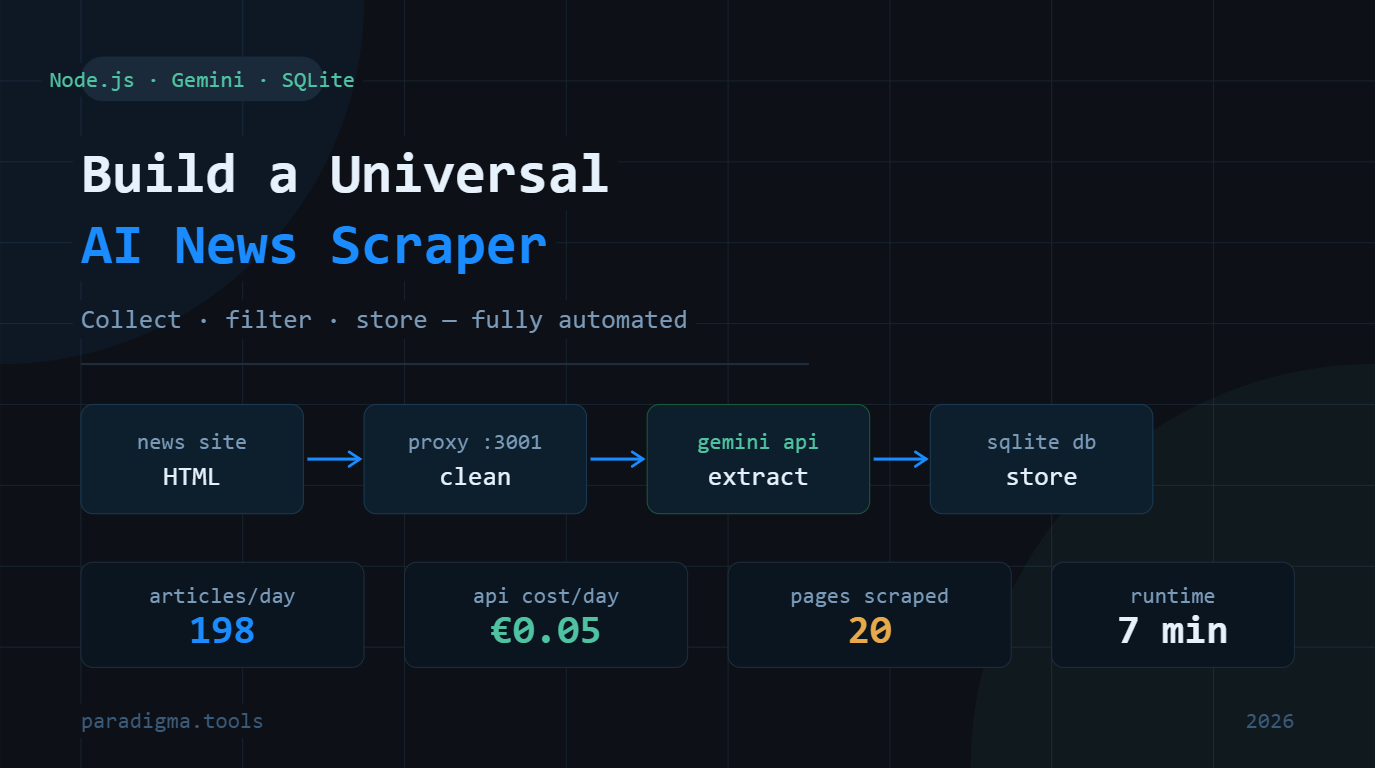
Proxy Server (port 3001) — A Node.js HTTP server with two endpoints. The /fetch endpoint downloads any URL, strips scripts and styles, preserves structural HTML tags, extracts pagination links from raw HTML before truncation, and returns clean structured content. The /ai endpoint receives page content and a prompt, sends them to Gemini API with automatic retry on rate limit errors, and returns the model's reply.
Scraper Script — A Node.js script that orchestrates everything. It runs in two phases: Phase 1 collects all article links from listing pages following pagination automatically, Phase 2 visits each article URL, extracts full content via Gemini, and saves to the database.
SQLite Database — A local single-file database storing articles with fields for URL (unique, prevents duplicates), title, content, date, source, and creation timestamp.
[Any news website]
       ↓ HTTP fetch (browser-like headers)
[Proxy Server — server.js :3001]
       ↓ clean HTML + pagination link
[Gemini 2.5 Flash Lite API]
       ↓ structured JSON
[scrape.js]
       ↓ INSERT OR IGNORE
[news.db — SQLite]
Why Gemini and Not a Local Model?
We tested local models (Llama 3.2, Mistral 7B via Ollama) for this task. The results were disappointing — small models running on CPU are too slow for processing hundreds of pages, they hallucinate pagination links that don't exist, and they struggle to distinguish main content from sidebar widgets when the page structure is complex.
Gemini 2.5 Flash Lite solves all of these problems. It processes a full cleaned page in 1–2 seconds, correctly identifies article dates in any language and format, understands semantic HTML structure, and costs practically nothing — roughly €0.55 per 200 articles.
Step 1: Get Your Gemini API Key
Go to aistudio.google.com/api-keys and create a new key. The free tier gives 20 requests per minute which is fine for development. For production scraping, add a payment method — costs roughly €0.25 per month at typical daily usage.
Paste your key into server.js on line 10:
const GEMINI_KEY = 'your_key_here';Step 2: The Proxy Server (server.js)
The proxy server is the heart of the system. Its most critical job is extracting the next-page link before stripping HTML attributes — a subtle but important detail.
When we clean HTML we strip attributes like rel="next" and aria-label to reduce content size for the AI. But those are exactly the attributes that identify the pagination link. So we call extractNextPage() first on raw HTML, then clean everything else.
The function looks for three patterns that cover the vast majority of news sites:
rel="next"— the standard HTML5 pagination attributearia-labelcontaining "next", "далі", "вперед", "следующая"- Elements with class
is-next— common in CSS frameworks
// server.js
// [INSERT FULL server.js CODE HERE]
The cleanHtml() function keeps structural tags (<main>, <article>, <section>, <aside>, <nav>, <time datetime>) while removing everything else. This gives Gemini enough context to distinguish main content from sidebars without processing megabytes of raw HTML.
The askGemini() function reads the actual wait time from Gemini's rate limit error response (retry in 23.9s) and waits exactly that long before retrying. No guessing, no fixed delays.
Step 3: Install Dependencies and Run the Server
cd your-project-folder
npm install better-sqlite3
node server.js
You should see:
Server running at http://localhost:3001Test it by opening this URL in your browser:
http://localhost:3001/fetch?url=https://example.comYou'll get a JSON response with text, links, and nextPage fields.
Step 4: Smart Pagination Discovery
The scraper never has a hardcoded list of page URLs. It starts from one URL and follows the "next page" link automatically on every page.
Different sites use completely different pagination patterns:
https://site.com/news/page/2— WordPress stylehttps://site.com/news/page-2— dash separator (TSN.ua as an exemple for the article)https://site.com/news?page=2— query parameterhttps://site.com/news-2.html— flat HTML style
The proxy handles all of them because it looks for semantic attributes in the HTML, not URL patterns. The scraper just reads pageData.nextPage from the proxy response and follows it blindly.
Step 5: AI-Powered Date Filtering
This is where the approach really shines over traditional scrapers. News sites display dates in wildly different formats:
<time datetime="2026-04-21T17:30:00+03:00">— standard HTML521 квітня 2026— Ukrainian long formСьогодні, 17:30— "Today" in Ukrainian- Just
17:30— time only, implying today
A traditional scraper would need custom parsing logic for each format on each site. We just tell Gemini today's date and ask it to filter:
Today is 2026-04-21.

Extract news article links from the MAIN content area published TODAY only.
Dates can be in any format: <time datetime>, "21.04.26", "17:30" (time only = today), "сьогодні", etc.
EXCLUDE: sidebars, "читайте також", ads, navigation, category/tag/author pages.
Set "stop": true if you see articles from YESTERDAY or earlier in the main content.

Return ONLY valid JSON:
{"articles":[{"title":"...","url":"https://..."}],"stop":false,"reason":"..."}
The stop flag is the key mechanism. When Gemini sees yesterday's articles in the main content, it returns "stop": true and the scraper stops following pagination — no matter what page number we're on.
Step 6: Article Content Extraction
Phase 2 visits each article URL and extracts the actual content. The prompt is deliberately minimal:
Extract the following from this news article page:
1. "title" — the article headline
2. "date" — publication date in YYYY-MM-DD format
3. "content" — full article text, clean, no ads or navigation

Return ONLY valid JSON with no explanation, no markdown, no text before or after:
{"title":"...","date":"2026-04-21","content":"..."}
Notice there is no summary field. It's tempting to generate summaries while scraping but it wastes tokens and time for something you may never use. Store raw content now, generate summaries on-demand when you actually need them for analysis.
Step 7: The Scraper Script (scrape.js)
// scrape.js
// [INSERT FULL scrape.js CODE HERE]
The INSERT OR IGNORE SQL statement combined with the UNIQUE constraint on the url column handles all deduplication automatically. Run the scraper every hour — it silently skips any article already in the database.
Running It
You need two terminal windows:
Terminal 1 — proxy server (keep running):
node server.jsTerminal 2 — scraper (run when you want fresh articles):
node scrape.jsTo scrape a different news site, change just one line at the top of scrape.js:
const START = 'https://your-news-site.com/news';Results
Running against TSN.ua (major Ukrainian news site, as an exemple for the article) on April 21, 2026:
- Phase 1: 198 article links collected from 20 pages — stopped automatically when yesterday's articles appeared
- Phase 2: 198 articles fetched, cleaned and stored
- Total time: ~11 minutes
- Total cost: €0.55 in Gemini API credits
- Database size: ~8MB
The scraper correctly ignored sidebar widgets with old popular articles, horoscopes, weather forecasts, and currency rate pages. Only actual news articles published that day made it into the database.
Viewing the Database
Download DB Browser for SQLite — free, open source. Open news.db and you see all articles in a spreadsheet-like view. You can filter by date, search content, export to CSV.
What's Next
WordPress autopublishing — a script that reads from the database and publishes to WordPress via REST API. Combined with Claude rewriting content in Spanish, German or Polish, this becomes a fully automated multilingual news site.
Multiple sources — the same server and scraper work on any news site. BBC, Reuters, TechCrunch, regional sites in any language — one codebase handles all of them.
Scheduled execution — add a Windows Task Scheduler job or Linux cron to run node scrape.js every morning. Wake up to a full database of today's news.
Analysis layer — a second script reads today's articles from SQLite, sends them to Claude API, and generates a morning briefing: key stories, trends, implications. The database becomes an intelligence feed.
Built in one day using Node.js 23, Gemini 2.5 Flash Lite, and better-sqlite3. The hardest part was discovering that pagination links disappear when you strip HTML attributes — which is why extractNextPage() must run on raw HTML before any cleaning.
Download Source Code
- sources — proxy server with Gemini integration + two-phase scraper with SQLite storage